
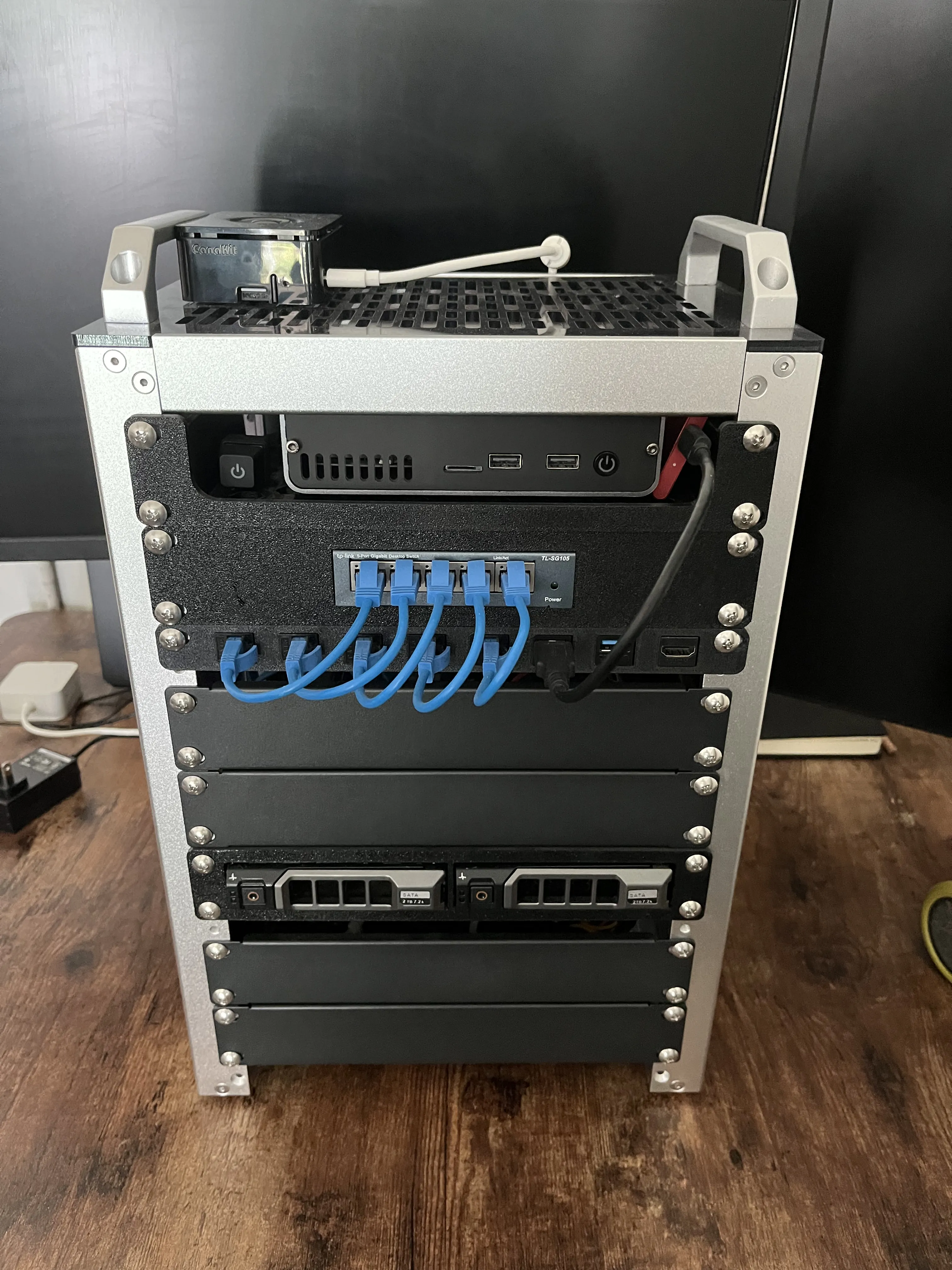
The Home Server
I thought it would be a good idea to have a post that documents my current home server environment, describing the different hardware and software that I have put together over time.
I've gone through a few different iterations with my home server setup, but I have recently rebuilt everything using energy efficient consumer hardware. I'll focus on documenting my current home server environment, considering that it will be helpful for me to use as a reference while maintaining the server.
Hardware
The reason I switched back to consumer hardware, was to make sure I'm not wasting electricity or introducing devices that end up too loud to keep running 24/7. I realized that having hot-swappable dual PSUs, built in monitoring, and an excessive amount of hardware interfaces, was interesting to work with, but I decided to care more about using hardware that was more efficient for my actual needs.
10" Server Rack:
- GeekPi 8U 10" Rack
Raspberry Pi 5 8GB RAM:
- OpenWRT
- Router/Firewall for all devices in the server rack
- Connected as a WiFi Client to the main home network
- Static route from the home network to the server network
- Sits on top of the rack
Raspberry Pi 4 8GB RAM:
- 1U 3D printed rack shelf
- DeskPi Pro Case
- SATA hat and 128GB SSD (boot drive)
- Raspberry Pi OS
- Lightweight services for the home network
- NUT server, automates shutdown of all server rack mounted devices
- Shelf holds a 512GB Samsung T7 portable SSD as well
tp-link TL-SG105:
- 1U 3D printed rack mount
- 5 ports
- No PoE support
8 port keystone patch panel:
- 0.5U 3D printed rack mount
- 5x CAT6 Ethernet
- 2x USB 3.0
- 1x HDMI 2.1
Asrock H310M-ITX/ac:
- 1U GeekPi Minit-ITX rack mount shelf
- 1U of blank space above the board for CPU cooler, wires, etc.
- Intel i5-8400 (6) @ 4.000GHz
- 32GB DDR4 2500 RAM
- 1TB WD NVMe
- 2x 4TB SATA HDD (See below)
Dual HDD hot-swap bay:
- 1U 3D printed rack mount
- Support Dell HDD caddies
- 2x 4TB SATA HDD
- HGST Deskstar NAS
- Seagate Exos Enterprise
Seasonic G-Series Modular PSU:
- 2U DeskPi metal shelf
- Zip-tied to the shelf so it doesn't move
- Runs the Mini-ITX board and 2 HDDs
Cyberpower UPS:
- Runs all equipment in the rack
- Custom NUT configuration
Software
All of the software in my server environment is meant to be used for my own convenience. I run personal software tools that help manage backups of personal machines, test software, or help streamline/automate workflows. I make it a point to keep the server environment separate, so it does not impact anyone on the main home network, meaning it can also be a place to experiment without affecting other users.
I'm running the Debian based Proxmox Virtual Environment, which provides a GUI (web) and some useful tools for interfacing with LXC and KVM. I'm sure this list will become obsolete quickly, but here are some of the services I am running at the moment.
- Nginx Proxy Manager (LXC)
- Pi-hole (LXC)
- Grafana (LXC)
- Prometheus (LXC)
- prometheus-pve-exporter (LXC)
- Vaultwarden (LXC)
- Jellyfin (LXC)
- PeaNUT (LXC)
- Proxmox Backup Server (LXC)
- OPNsense (VM)
- Open Media Vault (VM)
- K3s head node (VM)
- K3s worker (VM)
- K3s worker 2 (VM)
I'm using all of these services to monitor my server environment, manage network access, and backup various devices. The goal is to build something that is fully managed by ansible, that can be wiped clean and re-deployed into a running state with little to no manual intervention.
Most services are self-explainable, as for some of the VMs:
- OMV has access to my SATA ports via interface pass-through. It runs my 2 HDDs in a SnapRAID array, 1 parity and 1 data drive. The array is accessible via NFS.
- OPNsense is the router/firewall that sits between my internal network and a software defined VLAN. This VLAN is where I run an isolated K3s cluster at the moment, but it is basically a test environment that I can use to deploy anything that I want to 100% keep away from affecting my internal server network, or my home network.